WoAG Occupation Coding Service User Guide
Details the API endpoints available for the Coding Service, and provides access and integration instructions.
Introduction
The Whole-of-Australian-Government (WoAG) Occupation Coding Service (‘the Coding Service’ or ‘the service’) was designed by the Australian Bureau of Statistics (ABS) to provide a single occupation coder across government, industry and the community.
The Coding Service codes occupation data to the latest Australian standard occupation classification titles and codes.
Design
The Coding Service was built with supervised machine-learning technology, to train hierarchical support vector machine (HSVM) models that provide high-quality and comprehensive automated coding against hierarchical classification categories. A confidence threshold is applied to the service, ensuring that outputs are high quality.
The service is called via an Application Programming Interface (API), designed to support integration across systems and platforms (including online forms and survey instruments) by offering authenticated, standards-compliant endpoints.
All API services are hosted in Australia to comply with relevant data sovereignty and privacy regulations.
Users have the option to register as a public or partner user to enable the following services:
Public user
- Single record (synchronous) coding
- Small batch synchronous coding (up to 300 records)
Partner user
- Single record (synchronous) coding
- Small batch synchronous coding (up to 300 records)
- Large-file asynchronous upload/download bulk coding (from 1 record to millions of records)
Public user real time coding API calls are throttled at 1 request per second, with a ceiling of 1,000 requests per day. Partner user API calls are throttled at 1 request per second, with a ceiling of 10,000 requests per day. Limits can be increased on a case-by-case basis (email coding.capability@abs.gov.au in the first instance).
Security and technology standards
The Coding Service and API have been security assessed by an independent registered assessor within the Australian Signals Directorate (ASD) Information Security Registered Assessors Program (IRAP) Program. This assessment found the Coding Service and API to have met the control and security objectives defined through the Australian Government Information Security Manual (ISM).
The service has been built to comply to the ISM and the Protective Security Policy Framework (PSPF). It leverages modern web API technologies in accordance with the Australian Government’s API Standard and globally recognised security frameworks. These standards ensure that the service is designed for safe, scalable integration across government and public-facing systems.
Both public and partner service users will be registered, and will be provided with relevant authorisation tokens to access the service.
See Coding Service security for more detail, including security controls to assist partner agencies in assessing their risks when using this service.
Using the guide
This user guide supports access to and use of the WoAG Occupation Coding Service. It is targeted toward software developers and technical professionals integrating the service into a client application.
The guide outlines the API endpoints available for accessing and using the service, and provides integration instructions for calling the API. It is structured to be followed sequentially from Getting started through to Gathering parameters.
Users will then proceed to Real-time (synchronous) coding for single record or small batch coding, or Asynchronous batch coding, depending on the data to be coded.
Synchronous coding
- The synchronous single-record coding service is designed for real-time usage (~1 second per record). It is suitable for small volumes and live systems such as online forms and web surveys. Synchronous coding also supports coding small batches of records (up to 300 records) with similar per-record timing.
- Note: This service is not optimised for large volumes and should not be used for high-throughput workloads. Use asynchronous coding for scalable batch processing.
Asynchronous coding
- Asynchronous batch coding is designed for large datasets (from a single record to millions of records). While asynchronous coding is the most efficient service for larger batches of data, it is not real-time, and may be queued during high load periods.
- Batch uploads are submitted via the API, and status is checked via polling (operation endpoints).
- Response times for batch requests may range from a few minutes to several hours depending on file size, system demand and current queue load at the time of submission.
Integration script examples
A set of integration script examples have been included in the Coding Service About page (Using the service). The ABS does not provide maintenance or support for end users’ own applications, but these examples could help shape your approach to integrating with the coding API, or converting batch coding output.
Getting started
Coding Service access instructions.
Pre-testing readiness
Before accessing the service, you will need to register for the coding service (see Registration). You will also need to consider the following:
- What you need to set up to pass the API packet to your API endpoint (url).
- What data you are going to code.
- Whether you need single record coding, small batch coding (up to 300 records), or large batch coding.
- Whether you need to reformat your data (for example, batch data will need to fit specific formats, and you may want to add record identifiers to map back to your dataset).
See also Coding Service formats, and the following sections in Using the service: Important context for model use, Tips for getting the best predictions out of the Coding Service, and Review coding outputs.
Terms of Use
The use of the Coding Service API is governed by the Coding Service Terms of Use (which includes Service Level Expectations). All API users will be required to accept these Terms of Use prior to gaining access to the service.
Users requesting access to the service must be appropriately authorised to accept the Terms of Use on behalf of their organisation.
Registration
To register for the service and request client credentials, please read and accept the Terms of Use and complete the Registration Form.
Once you have registered, your ABS contact will email you:
- a client identifier, 'clientID', and
- a client secret, 'clientSecret'. These must be kept confidential as they are used when authenticating your requests.
The ABS will monitor registrations for usage, and users will be notified via email if their access is under review.
Authentication
Authentication information and instructions.
An authentication token is required to use the Coding Service. This is a unique, time-limited access key which is used to authenticate all API calls to the service.
Note: Authentication is only required once every hour.
Do not include an authentication script in every API call. Too many token requests may result in an error. This error may also occur for you if there have been excessive authentication requests from anyone else in the organisation. See Session Token Usage for more information.
Get an authentication token
To get an authentication token, you must first call the service’s authentication endpoint with an authorisation header. More details are available in the AWS documentation, but the key input parameters are described below.
Request syntax
POST /oauth2/token HTTP/1.1
Host: string
Content-Type: application/x-www-form-urlencoded
Authorization: string
{
    grant_type: "client_credentials"
}
See Integration script examples for an example PowerShell script to request an authentication token.
Request header parameters
Host:
The host name for your chosen API. This will be either https://partner-coder.auth.abs.gov.au or
https://public-coder.auth.abs.gov.au depending on whether you have registered for the partner or the
public coding service.
Authorization:
Basic authorisation method with a base64 authorisation token (encodedAuthString), computed from the
client ID and client secret provided upon registration.
encodedAuthString can be computed via the bash command:
     $ echo -n "${clientID}:${clientSecret}" | base64
     Type: String
Response syntax
HTTP/1.1 200 OK
Content-Type: application/json
{
     access_token: "string"
}
Response elements
access_token
Your unique access token which can be used to authenticate all API calls to the coding service.
Type: String
Examples
On registering for the coding service, this user was issued with the following:
- ClientID: “client1”
- ClientSecret: “secret123”
encodedAuthString should be the base64 encoding of “client1:secret123” and the entire request is as follows:
| Sample request | |
|---|---|
| Sample response | |
(See Integration script examples for an example PowerShell script to request an authentication token.)
Use an authentication token
To authenticate against the coding API service, you will need to include your access token in the header of any API calls.
- Your token will last one hour from the time of issue, after which you will need to request a new token.
- You do not need to request a new token for each API call.
The API calls are of a short duration, usually less than a few seconds. When initiated, each call will check the authentication and then continue with the rest of the call. If the call was approved at the start, it will return a response if the timer runs out.
Asynchronous batch calls may take longer to return results, and you may have to re-authorise to receive the results.
Request header parameters
Authorization
The authorisation token retrieved via the Authentication mechanism.
Type: String
Host
The host name for your chosen API. This will be either https://partner-coder.api.abs.gov.au or
https://public-coder.api.abs.gov.au depending on whether you have registered for the partner or the
public coding service.
Type: String
Session token usage
For optimal performance, please reuse a single session token per hour, and avoid hitting service limits by caching tokens. Single session tokens will be valid for all users interacting with webforms or interfaces during that time.
- Token Type: AWS Cognito M2M session token.
- Token Validity: 60 minutes.
- Usage Scope: Expect shared use of a single token across all users of a webform/integration/process.
- Storage: Store locally in your backend (e.g., in-memory, file, cache).
- Rate Guidance: Max 1 token request per hour per webform.
Exceeding this limit may result in your service being blocked or degraded. Restrictions are time limited, and requests for authorisation during this time will result in HTTP 403 errors.
Please ensure that any scripts written for others to copy and paste (i.e. for coding single records or running small batches) do not include a token call. Provide authentication scripts separately to be used at need.
Recommended integration pattern
- Backend checks for existing token.
- If token is valid, reuse it.
- If token is expired or missing, request a new one.
- Use the token to call the API for all users of the form.
Token re-use flow diagram
Recommended flow for session token re-use across users of a webform.
Coding service formats
Request formats and recommended text inputs.
Request formats
The coding service uses JSON format for the following services:
- Real-time (synchronous) public coding service
- Real-time partner coding service
- Real-time small batch coding service
It uses JSONL format for the large batch/bulk (asynchronous) partner coding service.
The GET Data method will return the following for each of the specified services for occupation coding:
| Service | Returns |
|---|---|
| Real-time (synchronous) public coding service |
|
| Real-time partner coding service |
|
| Real-time small batch coding service (up to 300 records) |
|
| Large batch/bulk (asynchronous) partner coding service |
|
Recommended text input for coding
- The occupation coder will perform optimally when provided with both a job title and tasks as free text inputs, as this is how the ML training was carried out.
- Large batch (asynchronous) coding requires both the occp_text and tasks_text fields in the call. If input text for one or other of the fields is not available, include the blank field. For example:
"occp_text": "sewing machinist"
"tasks_text": "" - The coder will not perform as well with just one text field completed (i.e if only the job title or only the task text is entered). If results are unsuccessful, entering more information will help the service make better predictions.
- For synchronous coding, text strings can be a maximum of 100 characters only (a total of 100 characters for combined occupation and task input text entries).
- For asynchronous coding, text strings can be a total of 300 characters for the combined fields.
- The coding service API will not accept custom data queries or query string parameters.
- The service does not recognise classification codes as inputs. While it is not possible to recode a six-digit ANZSCO code to a six-digit OSCA code, datasets with only ANZSCO codes may be recoded to OSCA if the ANZSCO occupation title is reattached to each record. Including more information as a tasks text entry, such as the occupation descriptions from the classification, will give better outcomes.
- The coding service has been trained on English inputs only. The service accepts printable ASCII characters, which includes all English letters and connectives, but excludes certain accents, foreign currency symbols and control characters like file endings or backspace. Including a bad character may result in an 'Invalid request body' error.
Contextual considerations
The contextual assumption of the input text is that the text relates to and describes a person’s job. The coder is able to recognise a very broad vocabulary and will attempt to code all input text, regardless of context, so users need to ensure a contextual fit between their input data and the coding task being undertaken.
For example, if a person enters their job text as ‘prisoner’, the Coding Service assumes a context that the job to be coded works with prisoners in some way, and codes to ‘Correctional Officer’. Likewise, the input text ‘student’ codes to ‘Student Services Adviser’.
The OSCA 2024 model also returns non-classification codes for responses that are not occupations within the scope of the classification:
code label
099900 Not in the labour force nfd
099888 Inadequately described
099920 Child/baby
099930 Invalid pensioner
099940 Other pensioner
099950 Housewife/husband
099960 Retired
099970 Unemployed/Not work for the dole
(Please note: the ANZSCO 2022 model also available in the Coding Service does NOT include non-classification codes.)
Multiple occupation entries
The service is designed to provide a single occupation code and title for a single record. If multiple jobs per record are entered in the occp_text field, the coder will attempt to code the provided text to a best fit single occupation code at the most detailed level.
The output will reflect the training data, and will depend on how many times the two jobs were present together in the training data. The Coding Service will default to whatever is most commonly found in the training data.
- If multiple jobs are present, you will need to format each job as a separate request.
Likewise, if people combine non-classification labels with job titles, such as ‘retired boilermaker’, ‘unemployed postman’, etc, the coder will attempt a best fit code. This may be ‘retired’, or ‘boilermaker’, or something else entirely depending on the context and the amount of times the combination of words appeared in the training data. These records may require review.
For more detail, see Using the service: Important context for model use, Tips for getting the best predictions out of the Coding Service, and Review coding outputs.
API Endpoints and HTTP methods
Coding Service endpoints and methods.
The API endpoints and their HTTP methods are outlined below in both the table and the diagram.
| Endpoint | Description | HTTP verb |
|---|---|---|
| /v1/topics | Retrieve a list of available topics. | GET |
| /v1/topics/{topic} | Describes the input format for the given topic. | GET |
| /v1/topics/{topic}/code | Synchronously codes a single record or small batch of records against the latest model for a given topic. | POST |
| /v1/topics/{topic}/models | Lists the available models and their input formats for a given topic. | GET |
| /v1/topics/{topic}/models/latest | Describes the input format for the latest model for a given topic. | GET |
| /v1/topics/{topic}/models/{model}/code | Synchronously codes a single record or small batch of records against a specific model for the given topic. | POST |
| /v1/topics/{topic}/batch-code | Creates a new asynchronous batch inference operation against the latest model for a given topic. | POST |
| /v1/topics/{topic}/models/{model}/batch-code | Creates a new asynchronous batch inference operation against a specific model for the given topic. | POST |
| /v1/topics/{topic}/batch-code/operations/{operation_id} | Checks the status of a batch inference operation. | GET |
| /v1/topics/{topic}/models/{model}/batch-code/operations/{operation_id} | Checks the status of a batch inference operation. | GET |
| /v1/security.txt | Returns contact details for reporting issues. | GET |
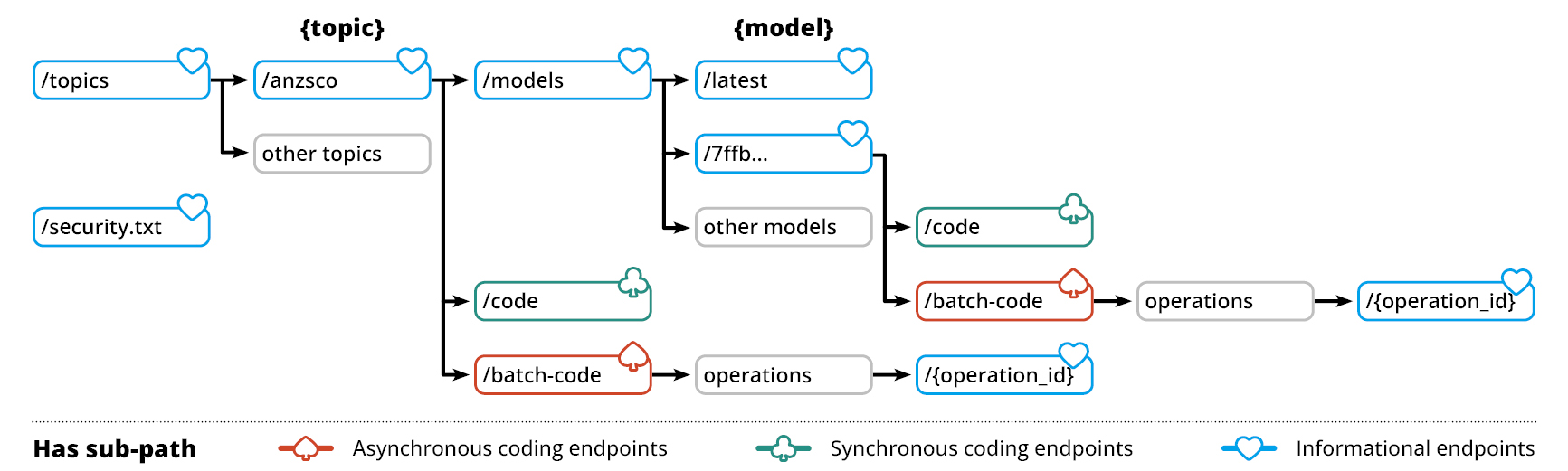
Flow chart showing http methods and their progression to asynchronous coding endpoints, synchronous coding endpoints, and informational endpoints for the Occupation Coding Service.
Gathering parameters
Information on topics and models.
Listing available topics
Before coding against a topic (classification), you must confirm that the topic is supported by the application. You will also need to record its corresponding uriName for further calls to the API.
Request syntax
GET /v1/topics HTTP/1.1
Host: string
Content-type: application/json
Authorization: string
URI request parameters
The request does not use any URI parameters.
Request body
The request does not have a request body.
Response syntax
HTTP/1.1 200 OK
Content-type: application/json
[
    {
        "uriName": "string",
        "fullName": "string"
    }
]
Response elements
If the action is successful, the service sends back an HTTP 200 response. The API returns an array of Topic objects representing all the coding topics currently supported by the API.
Errors
For information about errors selecting topics, see Errors and suggested actions.
Example
| Sample request | |
|---|---|
| Sample response | |
Getting the input format for the latest model for a topic
Different models are coded against different input formats. If you are using the latest (default) model for your specified topic, you can get the input format via the following mechanism.
If you are using another model, the input format will be provided as part of the list of available models.
Request syntax
GET /v1/topics/{topic}/models/latest HTTP/1.1
Host: string
Content-type: application/json
Authorization: string| topic | The uriName for the coding topic of interest. This can be acquired by listing the available topics. Required: Yes |
|---|
Request body
The request does not have a request body.
Response syntax
HTTP/1.1 200 OK
Content-type: application/json
{
    "modelId": "string",
    "modelVersion": number,
    "modelReleaseDate": "string",
    "modelType": "string",
    "inputFormat":  [
        "string"
    ],
    "topicStandard": "string",
    "topicVersion": "string"
}
Response elements
If the action is successful, the service sends back an HTTP 200 response. The API returns a Model object representing the latest model for the given topic, which includes the expected input format.
Errors
For information about errors selecting models, see Errors and suggested actions.
Example
Getting the latest occupation model:
| Sample request | |
|---|---|
| Sample response | |
Listing available models for a given topic
To code against a specific machine learning model, you can browse the available models and their input formats by calling this endpoint.
Request syntax
GET /v1/topics/{topic}/models HTTP/1.1
Host: string
Content-type: application/json
Authorization: string| topic | The uriName for the coding topic of interest. This can be acquired by listing the available topics. Required: Yes |
|---|
Request body
The request does not have a request body.
Response syntax
HTTP/1.1 200 OK
Content-type: application/json
[
    {
        "modelId": "string",
        "modelVersion": number,
        "modelReleaseDate": "string",
        "modelType": "string",
        "inputFormat": [
           "string"
        ],
        "topicStandard": "string",
        "topicVersion": "string"
    }
]
Response elements
If the action is successful, the service sends back an HTTP 200 response. The API returns either a SynchronousCodeResponse object or an array of SynchronousCodeResponse objects corresponding to the input records.
Errors
For information about errors selecting models, see Errors and suggested actions.
Example
Listing all ANZSCO models:
| Sample request | |
|---|---|
| Sample response | |
Real-time (synchronous) coding
Single record and small batch coding.
Single record coding
The coding service has been designed to apply a classification code and title to a free text entry. The synchronous single record coding feature will enable public facing webforms and other points of data collection to have codes and titles suggested in real time (~1 second).
- The service will provide multiple responses within a classification category, as long as at least one response has a confidence level above the threshold.
- It may only provide one response - for example, if there is only one six-digit code in the relevant category.
- If no responses are above the confidence threshold, the service will not return any results.
Small batch coding
A small JSON file of up to 300 text records can also be coded synchronously.
Note: when you are running a synchronous small batch, the whole packet needs to be syntactically correct. If the syntax fails, the whole batch will fail. As the operation is combined for the whole group of records, none of the records will be able to be coded if there is an error in any record.
When to use synchronous or asynchronous coding
Synchronous coding should only be used for single record coding or small batches of data. If you are coding 900 records, for example, it will be possible to run them in three small batch submissions.
Asynchronous large batch coding is recommended if you need to code or recode a large volume of data. (Large batch coding can be used to code from 1 record to millions of records.)
Coding against the latest model for a topic
This endpoint is used to code a single or small batch of free text records against the specified coding topic, using the latest model for that topic.
Request syntax
Depending on whether you are coding a single record or a small batch of records, your request will follow one of the following formats:
1. Coding a single free text record
POST /v1/topics/{topic}/code HTTP/1.1
Host: string
Content-type: application/json
Authorization: string
{
    "record": {
        "occp_text": "string",
        "tasks_text": "string"
    },
    "numberOfSuggestions": number
}
2. Coding a small batch of free text records
POST /v1/topics/{topic}/code HTTP/1.1
Host: string
Content-type: application/json
Authorization: string
{
    "records": [
        {
            "recordId": "string",
            "occp_text": "string",
            "tasks_text": "string"
        },
    ],
    "numberOfSuggestions": number
}
See Integration script examples for example PowerShell single record and small batch coding scripts.
| topic | The uriName of the topic against which the record is coded. This can be acquired by listing the available topics. Required: Yes |
|---|
| record | The free text record to be coded. Type: Record object, following the input format specified by the model. Required: No, but either record or records must be provided. |
|---|---|
| records | The free text records to be coded. Type: Array of Record objects, following the input format specified by the model. Each item may optionally specify an additional string value recordId. Length Constraints: Minimum length of 1. Maximum length of 300. Required: No, but either record or records must be provided. |
| numberOfSuggestions | The number of suggested codes to be provided if the record cannot be coded successfully. The maximum value of this field is 16. Type: Number Required: No |
Response syntax
The response of this endpoint will depend on whether your input request contained a single record or a small batch of records.
1. Coding a single free text record
HTTP/1.1 200 OK
Content-type: application/json
{
    "codeStatus": "string",
    "input": {
        "occp_text": "string",
        "tasks_text": "string"
    },
    "result": [
        {
            "codeCategory": "string",
            "codeLabel": "string",
            "codeConfidence": number
        }
    ],
}
2. Coding a small batch of free text records
HTTP/1.1 200 OK
Content-type: application/json
[
    {
        "recordId": "string",
        "codeStatus": "string",
        "input": {
            "occp_text": "string",
            "tasks_text": "string"
        },
        "result": [
            {
                "codeCategory": "string",
                "codeLabel": "string",
                "codeConfidence": number
            }
        ],
    }
]
Response elements
If the action is successful, the service sends back an HTTP 200 response. The API returns either a SynchronousCodeResponse object or an array of SynchronousCodeResponse objects corresponding to the input records.
Errors
For information about synchronous coding errors, see Errors and suggested actions.
Examples
(Also see Integration script examples for example PowerShell single record and small batch coding scripts.)
| Successfully coded a single record using only one free text field: | |
|---|---|
| Sample request | |
| Sample response | |
| Successfully coded a single record using all free text fields: | |
|---|---|
| Sample request | |
| Sample response | |
| Unsuccessfully coded a single record using only one free text field: | |
|---|---|
| Sample request | |
| Sample response | |
| Coding a small batch of records: | |
|---|---|
| Sample request | |
| Sample response | |
Coding against a specific model
This endpoint is used to code a single or small batch of free text records against the specified coding topic, using the specified model.
Request syntax
Depending on whether you are coding a single record or a small batch of records, your request will follow one of the following formats:
1. Coding a single free text record against a specific model
POST /v1/topics/{topic}/models/{model}/code HTTP/1.1
Host: string
Content-type: application/json
Authorization: string
{
    "record": {
        "occp_text": "string",
        "tasks_text": "string"
    }
    "numberOfSuggestions": number
}
2. Coding records against a specific model
POST /v1/topics/{topic}/models/{model}/code HTTP/1.1
Host: string
Content-type: application/json
Authorization: string
{
    "records": [
        {
            "recordId": "string",
            "occp_text": "string",
            "tasks_text": "string"
        }
    ],
    "numberOfSuggestions": number
}| topic | The uriName of the topic against which the record is coded. This can be acquired by listing the available topics. Required: Yes |
|---|---|
| model | The model GUID for the model you would like to use to code records. This can be acquired by listing the available models for your topic. Required: Yes |
| record | The free text record to be coded. Type: Record object, following the input format specified by the model. Required: No, but either record or records must be provided. |
|---|---|
| records | The free text records to be coded. Type: Array of Record objects, following the input format specified by the model. Each item may optionally specify an additional string value recordId. Length Constraints: Minimum length of 1. Maximum length of 300. Required: No, but either record or records must be provided. |
| numberOfSuggestions | The number of suggested codes to be provided if the record cannot be coded successfully. The maximum value of this field is 16. Type: Number Required: No |
Response syntax
The response of this endpoint will depend on whether your input request contained a single record or a small batch of records.
1. Coding a single free text record
HTTP/1.1 200 OK
Content-type: application/json
{
    "codeStatus": "string",
    "input": {
        "occp_text": "string",
        "tasks_text": "string"
    },
       "result": [
        {
            "codeCategory": "string",
            "codeLabel": "string",
            "codeConfidence": number
        }
    ],
}
2. Coding a small batch of free text records
HTTP/1.1 200 OK
Content-type: application/json
[
    {
        "recordId": "string",
        "codeStatus": "string",
        "input": {
            "occp_text": "string",
            "tasks_text": "string"
        },
        "result": [
            {
                "codeCategory": "string",
                "codeLabel": "string",
                "codeConfidence": number
            }
        ],
    }
]
Response elements
If the action is successful, the service sends back an HTTP 200 response. The API returns either a SynchronousCodeResponse object or an array of SynchronousCodeResponse objects corresponding to the input records.
Errors
For information about synchronous coding errors, see Errors and suggested actions.
Examples
(Also see Integration script examples for example PowerShell single record and small batch coding scripts.)
| Successfully coded a single record against a specific model: | |
|---|---|
| Sample request | |
| Sample response | |
| Coding a small batch of records against a specific model: | |
|---|---|
| Sample request | |
| Sample response | |
Asynchronous batch coding
Coding a large volume of data.
In addition to real-time coding of single records and small batches of data, the Coding Service has been designed to code large datasets through asynchronous batching (that is, returning data after a short period of time).
The asynchronous service can be used for as little as one record, up to millions of records.
Note: Asynchronous batch coding should be used if you need to code or recode a large volume of data. While it is the most efficient method of coding larger datasets, it is not real-time, and may be subject to queueing during high load periods.
Getting an upload URL for input data to a batch coding operation
This endpoint is used to create an asynchronous batch inference operation. The API will return a location where you can upload your input file and begin your batch inference operation.
Request syntax
Depending on whether you are specifying a model against which to code your records, your request will follow one of the following formats:
1. Coding records against the latest model
POST /v1/topics/{topic}/batch-code HTTP/1.1
Host: string
Content-type: application/json
Authorization: string
2. Coding records against a specific model
POST /v1/topics/{topic}/models/{model}/batch-code HTTP/1.1
Host: string
Content-type: application/json
Authorization: string| topic | The uriName of the topic against which the record is coded. This can be acquired by listing the available topics. Required: Yes |
|---|---|
| model | The model GUID for the model you would like to use to code records. This can be acquired by listing the available models for your topic. Required: No |
Request body
The request does not have a request body.
Response syntax
HTTP/1.1 200 OK
Content-type: application/json
{
    "requestUploadUrl": "string",
    "operationId": "string",
    "bucketKmsKeyArn": "string"
}
If the action is successful, the service sends back an HTTP 200 response. The following data is returned in JSON format by the service:
| requestUploadUrl | A URL where the records file is to be uploaded. Type: String |
|---|---|
| operationId | The identifier of the operation, to be used to check the status of this job. This must be recorded at this point to maintain access to the operation. Type: String, in GUID format. |
| bucketKmsKeyArn | A parameter used by the ABS system to ensure the operation’s input data is from the same user who created the operation. This must be passed into the x-amz-server-side-encryption-aws-kms-key-id header when uploading your input file. Type: String |
Errors
For information about asynchronous coding errors, see Errors and suggested actions.
Examples
| Creating a new operation to code against the latest model: | |
|---|---|
| Sample request | |
| Sample response | |
| Creating a new operation to code against a specified model: | |
|---|---|
| Sample request | |
| Sample response | |
Uploading data for inference
Once you have created an inference operation, you will need to upload your data to the provided requestUploadUrl. This is a pre-signed HTTP request which is managed by the AWS S3 server, and the expected input is outlined below.
- Both occp_text and tasks_test fields are required (although one may be empty, indicated by “”).
Request Syntax
PUT requestUploadUrl HTTP/1.1
x-amz-server-side-encryption: aws:kms
x-amz-server-side-encryption-aws-kms-key-id: string
{ "recordId": "string", "occp_text": "string", "tasks_text": "string" }
...| requestUploadUrl | The location where the input file is being uploaded. This is provided when you first create the inference operation. Type: String |
|---|
Please note: the x-amz-server-side-encryption header is not variable and should always have the value aws:kms.
| x-amz-server-side-encryption-aws-kms-key-id | A parameter used by the ABS system to ensure the input data is from the same user who created the operation. This is provided in the bucketKmsKeyArn field when you first create your inference operation. Type: String |
|---|
The request accepts your input file in JSONL format. The maximum input file size is 5GB. All lines of input must contain the same fields, and these fields should satisfy the Record type for the relevant topic/model as specified when creating the upload URL. You may specify the additional field outlined below:
| recordId | An identifier for the record being coded. This need not be unique. Type: String Required: No |
|---|
Response Syntax
HTTP/1.1 200 OKErrors
For information about the errors that are common to all actions, see Errors and suggested actions.
Examples
| Specifying a record identifier: | |
|---|---|
| Sample request | |
| Sample response | |
| Specifying no record identifier: | |
|---|---|
| Sample request | |
| Sample response | |
Checking the status of a batch inference operation
This endpoint is used to check the status of your batch inference job. When the status of your job is complete, the service will return a URL to copy into your web browser to retrieve your coded data.
Request Syntax
Depending on whether you are specifying a model against which to code your records, your request will follow one of the following formats. The application backend handles these requests identically, so you don’t need to worry about recording the model which you used when you began the operation.
1. Checking an operation by specifying the topic only
GET /v1/topics/{topic}/batch-code/operations/{operation_id} HTTP/1.1
Host: string
Content-type: application/json
Authorization: string
2. Checking an operation by specifying both the topic and model
GET /v1/topics/{topic}/models/{model}/batch-code/operations/{operation_id} HTTP/1.1
Host: string
Content-type: application/json
Authorization: string| topic | The uriName of the topic against which the record is coded. This can be acquired by listing the available topics. Required: Yes |
|---|---|
| model | The model GUID for the model you would like to use to code records. This can be acquired by listing the available models for your topic. Required: No |
| operation_id | The GUID of the operation to get the status of. This value is provided when you first create your inference operation. Required: Yes |
Request Body
The request does not have a request body.
Response Syntax
HTTP/1.1 200 OK
Content-type: application/json
{
    "operationStatus": "string",
    "responseDownloadUrl": "string",
    "error": "string"
}
If the specified operation exists, the service sends back an HTTP 200 OK status code. The status of the operation will dictate the contents of the response. This data is returned in JSON format by the service:
| operationStatus | The status of the operation. Type: String Valid Values: awaiting_input | in_progress | complete | timed_out | failed |
|---|---|
| responseDownloadUrl | A URL where the output data file can be downloaded. This field is optional and is returned only if operationStatus is complete. Type: String |
| metadataDownloadUrl | A URL where the output metadata file can be downloaded. This file includes information about the model used to code your data.This field is optional and is returned only if operationStatus is complete. Type: String |
| error | Information on why the operation failed. This field is optional and is returned only if operationStatus is failed. |
A note about presigned URLs
The responseDownloadUrl and metadataDownloadUrl are presigned URLs. Anyone with this link will be able to download your output file, so it is your responsibility to keep the link secret.
The link will expire after one hour, after which you will have to get a new URL for your output file.
Your output files will be deleted from the system within 24 hours after your inference operation succeeds.
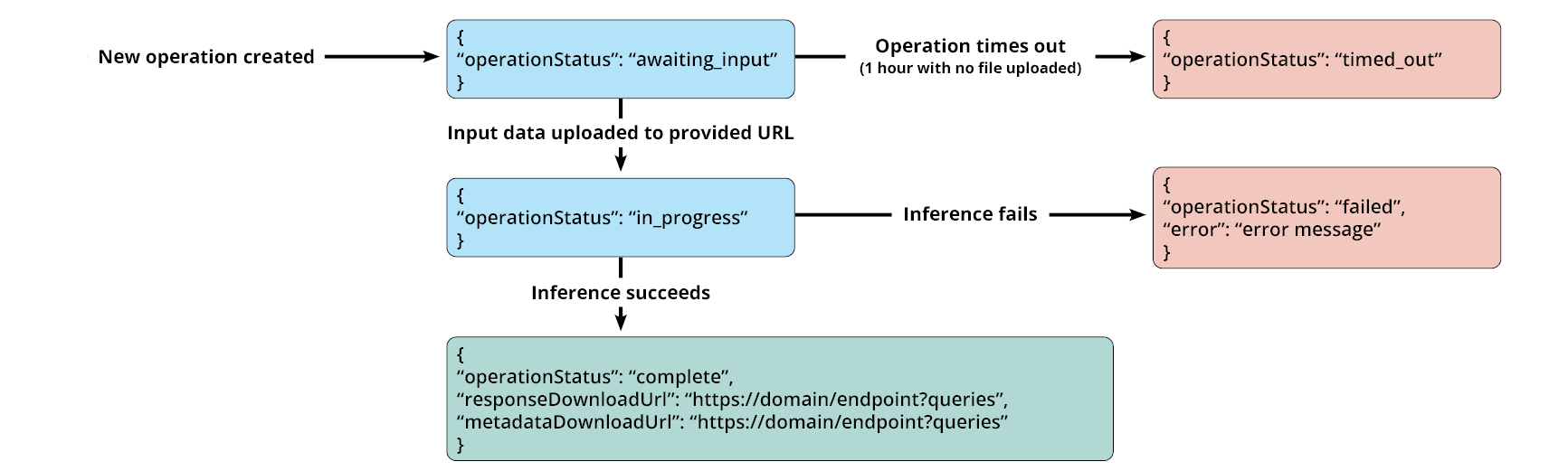
A state machine indicating the progression of operations is shown below:
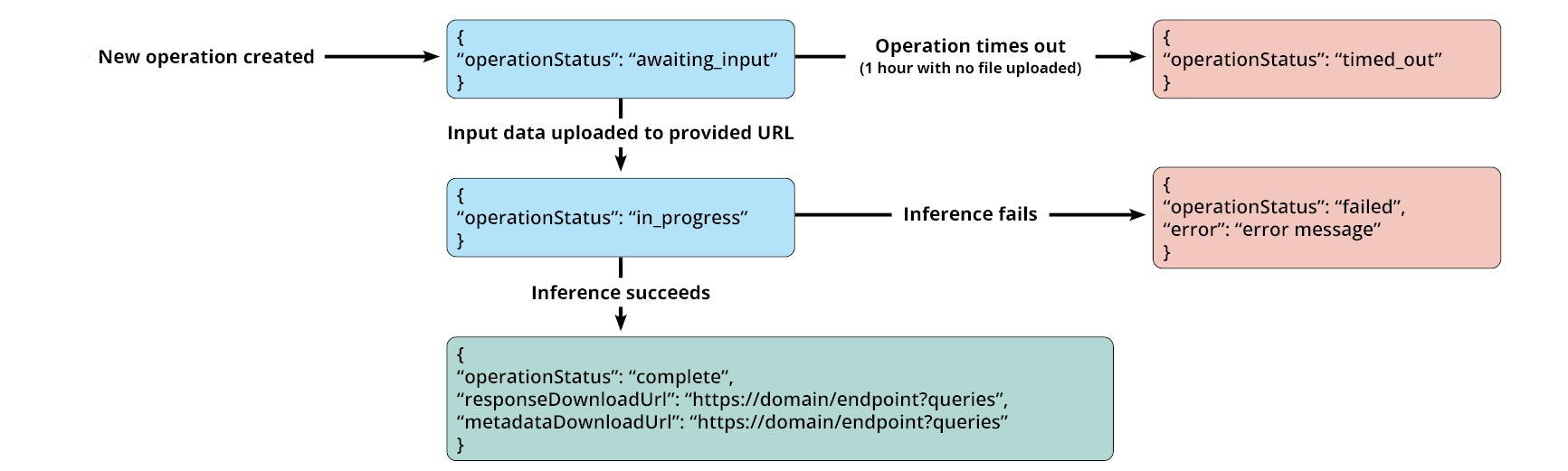
Flow chart of operational steps showing output messages if operation times out, if inference fails and if inference is successful.
If operation times out, output returned is "operation status: timed out".
If inference fails, output returned is "operation status: failed" and a relevant error message is provided.
If inference is successful, output is "operation status: complete" and the relevant response URLs are provided.
Errors
For information about asynchronous coding errors, see Errors and suggested actions.
Examples
| Getting the status of an operation: | |
|---|---|
| Sample request | |
| Sample request specifying the model used | |
| Sample responses | and any of the following: |
| Request sample | Expected response body | Interpretation |
|---|---|---|
| New operation (data not yet uploaded) | |
|
Just uploaded
| |
|
Never uploaded
| |
|
| Operation complete | |
|
| Operation failed | |
|
Downloading processed data from a complete operation
Once your asynchronous inference operation is complete, you can download the output file by accessing (copying into a web browser) the responseDownloadUrl that is provided when you check the status of a complete operation. The same process may be used to view the operation metadata, available at the metadataDownloadUrl.
This is a generic HTTP GET request which is managed by the AWS S3 server, and the expected format is outlined below.
Response Elements
The asynchronous batch coding service outputs a jsonl file with each line corresponding to the record from the original input file. Each line is an AsynchronousCodeResponse object.
Examples
| In response to input which specifies a record identifier: | |
|---|---|
| Sample request | |
| Sample response | |
| In response to input which specifies no record identifier: | |
|---|---|
| Sample request | |
| Sample response | |
Reporting issues
Coding Service support.
If you encounter bugs or have feedback on the service, please report these via the following mechanism:
Request syntax
GET /v1/security.txt HTTP/1.1
Host: string
Authorization: string
URI request parameters
The request does not use any URI parameters.
Request body
The request does not have a request body.
Response syntax
HTTP/1.1 200 OK
Content-type: text/html
<information on reporting errors>| Sample request | |
|---|---|
| Sample response | |
Support for other service issues
Please contact coding.capability@abs.gov.au for other service support. Business hours are 9 am to 5 pm Monday to Friday.
Errors and suggested actions
Glossary of common errors, explanations and solutions
These codes help identify issues on both the client and server sides, allowing for troubleshooting and resolution of HTTP request problems.
| Error message | Why this happened | You should… | |
|---|---|---|---|
| Common errors possible on all API calls | |||
| Invalid request body HTTP Status Code: 400 | Something was wrong with your request body syntax. Example: small batch records exceed length limit of 300/you tried to code too many records at once using the synchronous small batch service. |
| |
| User is not authorized to access this resource with an explicit deny HTTP Status Code: 403 | You have either not authenticated or your authentication token has expired. This error may also occur if there have been excessive authentication requests from others across your organisation. |
| |
| Limit Exceeded HTTP Status Code: 429 | You have made too many calls to the API. |
| |
| Too Many Requests HTTP Status Code: 429 | You have made too many API calls in a short period of time. |
| |
| Error performing request HTTP Status Code: 500 | This happens when something unexpected goes wrong on the server. In some instances, further context is provided. |
| |
| Problems selecting model or topic | |||
| The specified topic does not exist HTTP Status Code: 404 | No topics matched the provided topic parameter. |
| |
| The specified model does not exist HTTP Status Code: 404 | No models matched the provided model parameter. You’ll see this if the system can't locate the specified model - maybe due to a typo or outdated ID. |
| |
| Selected model does not match the input topic. HTTP Status Code: 409 | The given model GUID does not correspond to the specified coding topic. |
| |
| Errors on the get models endpoint | |||
| No models found for topic HTTP Status Code: 500 | No models are available for the provided topic parameter. |
| |
| Synchronous coding errors | |||
| Malformed record found in request HTTP Status Code: 400 | The free text input did not match the expected format for the model. |
| |
| Batch input contained no records HTTP Status Code: 400 | You tried to code a small batch of records but the records array was empty. |
| |
| There are record(s) outside the min or max char limit: Record with index x has a total text length under 3 min Record with index y has a total text length over 100 max … HTTP Status Code: 400 | One or more records provided had too many or too few characters. |
| |
| Asynchronous coding errors | |||
| User is not authorised to retrieve operation GUID HTTP Status Code: 401 | The specified operation does not belong to the current user. You may have authenticated with the wrong user or specified the wrong operation_id. |
| |
| Unable to retrieve operation for given id HTTP Status Code: 404 | No operations were found to match the given operation_id. This is most likely due to a typo. |
| |
See more information on HTTP errors at HTTP response status codes - HTTP | MDN.
Glossary of inputs and responses
Model details, Record and Response objects.
These fields are returned by various methods in Gathering parameters:
| Field | Description | Type |
|---|---|---|
| modelId | Unique identifier used to reference the ML model. | String (GUID format) |
| modelVersion | Version number of the model trained on the topic. Distinct from topicVersion. | Number |
| modelReleaseDate | Date the model was released, in ISO8601 format. | String |
| modelType | ML algorithm used (e.g., hsvm). | String |
| inputFormat | List of expected input field names. | Array of strings |
| topicStandard | Full name of the classification topic. | String |
| topicVersion | Version number of the topic classification used in model training. | String |
These are the fields expected when submitting data to the coding service:
| Field | Description | Type |
|---|---|---|
| occp_text | Free-text description of an occupation. | String |
| tasks_text | Tasks or duties related to the occupation. | String |
| recordId | Optional identifier for each input record. | String |
Response objects
These are returned after synchronous or asynchronous coding operations:
| Field | Description | Type |
|---|---|---|
| recordId | Identifier for the submitted input record (if originally provided). | String |
| codeStatus | Coding outcome. Valid values: successful, unsuccessful. | String |
| input | Input record submitted to the model. | RecordObject |
| result | List of predicted codes and labels. Min length: 0; Max: 16 (or value of numberOfSuggestions) | Array of CodedRecord |
| Field | Description | Type |
|---|---|---|
| recordId | Identifier for the record or null if none provided. | String |
| codeStatus | Coding outcome. Valid values: successful, unsuccessful. | String |
| input | Input record submitted to the model. | RecordObject |
| result | Top code assigned if coding was successful. | CodedRecord object |
| suggestions | List of alternate codes if coding was unsuccessful. Min length: 1; Max: 3 | Array of CodedRecord |
| Field | Description | Type |
|---|---|---|
| codeCategory | Code assigned to the input. | String |
| codeLabel | Description of the code category. | String |
| codeConfidence | Confidence score (e.g., 0.92). May be rounded or multiplied by 100 for a percentage. |
Coding Service security
Coding Service system security controls.
The WoAG Occupation Coding Service and API have been security assessed by an independent registered assessor within the Australian Signals Directorate (ASD) Information Security Registered Assessors Program (IRAP) Program. This assessment found the Coding Service and API to have met the control and security objectives defined through the Australian Government Information Security Manual (ISM).
Agencies may need to sign off in-house on using an external API, for business, legal, or security reasons. They may also need to check on their own behalf that the API response is from the address they sent the request to.
The following security controls, drawn from the ISM, are included to assist partner agencies in assessing their risks when using this service.
| Control name | System security controls |
|---|---|
| Cryptography |
|
| Data transfers |
|
| Data sovereignty |
|
| Machine Learning (ML) |
|
Contact us
Contact information for user support
Please contact the ABS for support via email: coding.capability@abs.gov.au. We aim to respond to all enquiries as soon as possible. Our business hours are 9am to 5pm Monday to Friday.